概要
AIエージェントツールは、AIエージェントがテキストを生成するだけでなく、データベースのクエリ、文書の取得、外部サービスの呼び出し、実際の行動を行うために呼び出す機能、API、データコネクター、コードインタプリタのことです。この用語は、エージェントが実行時に使用するツールと、開発者がエージェントを構築するために使用するツールの両方を含みます。このガイドは両方をカバーしていますが、主に前者に焦点を当てています。
企業がチャットボットから自律型エージェントへと移行する中で、エージェントがアクセスできるツールや、そのツールが接続するデータによって、エージェントがデモなのか信頼できる企業の一部なのかが決定されます。
AIエージェントツールとは何ですか?
AIエージェントツールとは、AIエージェントが自らの理性を超えて世界とやり取りするために呼び出せる実行可能な能力のことです。推論モデルがエージェントの脳であるなら、ツールはその手です。エージェントはデータベースのクエリ、ドキュメントの検索、SaaS APIの呼び出し、コードの実行、ビジネスワークフローの起動などを可能にします。
このフレーズは二つの重複した使い方があり、読者はしばしばそれらを混同します。
- エージェントが実行時に呼び出すツール: エージェントの推論モデルに露出し、タスクを進める際に選択・呼び出す関数。これがこのページの主要な意味であり、焦点です。
- 開発者がエージェントを構築するために使うツール: エンジニアがそもそもエージェントを組み立てるために頼るフレームワーク、ライブラリ、プラットフォームです。これらはこの記事の後半で詳しく説明します。
現代のエージェントツールと従来の関数呼び出しを分けるのは自律性です。古典的なアプリケーションは、プログラマが決めたときに関数を呼び出します。エージェントはどのツールをどの順序で呼び出すか、そして複数のコールをいつ連結して多段階のタスクを完了するかを自分で決定します。
要するに、AIエージェントツールとは、エージェントがタスクを完遂するために選択し呼び出しする、リトリバー、クエリ、API、コード実行、カスタム関数といった呼び出せる機能のことです。
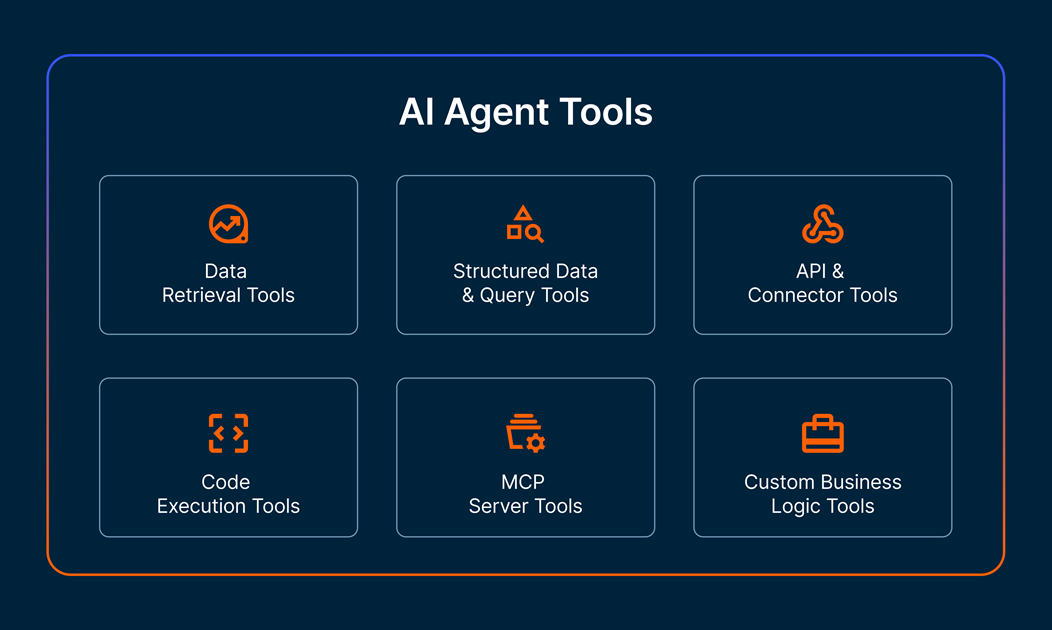
AIエージェントツールのコアタイプ
エージェントツールは、使用されているベンダーやフレームワークに関係なく、少数の認識可能なカテゴリーに分類されます。ほとんどの生産エージェントシステムは、1種類の能力だけでは実際の作業を完了できないため、いくつかの能力を組み合わせています。以下の6つのカテゴリーは、企業環境でエージェントが行うほとんどの業務をカバーしています。
データ検索ツール
データ検索ツールは、エージェントが関連する非構造化コンテンツを自分の推論文脈に引き込むことを可能にします。最も一般的なパターンは検索拡張生成(RAG)で、エージェントがベクトルインデックス、セマンティック検索エンジン、ドキュメントストアにクエリを行って次のステップに役立てる箇所を探します。これらのツールは、エージェントがナレッジベース、内部ウィキ、ポリシー文書、モデルのコンテキストウィンドウに収まらないテキストコーパスに基づく質問に答える手段です。
構造化データおよびクエリツール
構造化データツールは、エージェントに顧客記録、取引、運用データが保管されているテーブル、倉庫、レイクハウスなどのガバナンスされたエンタープライズデータへのアクセスを提供します。実際には、SQL実行ツール、データベースコネクタ、クエリインターフェースなどを使い、エージェントが信頼できるソースに対して正確な質問を行えるようにします。これらのツールの質は、多くのチームが思っている以上に重要です。本番データにクエリはできるのに、アクセス制御や行レベルのセキュリティ、データの系譜を尊重できないエージェントは、ガバナンスインシデントが起こる可能性が高いのです。このカテゴリーは、エンタープライズの要件がデモウェアと大きく異なる分野です。
APIおよびコネクタツール
APIやコネクタツールは外部サービスをラップし、エージェントは他の機能と同様にそれらを呼び出せます。これにはREST API呼び出し、ウェブフック、SaaSプラットフォームとの事前構築された統合(チケットシステム、CRM、決済処理業者、監視ツールなど)が含まれます。認証こそが静かな複雑さです。本番環境のデプロイメントではOAuthフロー、APIキーの回転、スコープ制限された認証情報を処理し、エージェントがアクセス権限のあるものだけに触れる必要があります。
コード実行ツール
コード実行ツールは、エージェントにサンドボックス化されたランタイム(通常はPython)を提供し、そこでデータを計算、変換、統計計算、チャート生成を即座に行えます。エージェントは、タスクが算術的変換や決定論的変換、または推論モデルが自ら確実に出力できない出力が必要な場合、コード実行に頼ります。ここでサンドボックス化が重要です。制限のないファイルシステムやネットワークアクセスを持つコードインタプリタはセキュリティリスクとなります。
MCPサーバーツール
MCPサーバーツールは、エージェントが外部ツールやデータに接続する方法に関するオープンスタンダードであるModel Context Protocolを通じて機能を公開します。MCPサーバーは関連するツール群をパッケージ化します。例えば、データベース上のすべての操作や内部APIのすべてのエンドポイントを、一貫したインターフェースを通じて宣伝します。管理型MCPサーバーは一般的なシステムの配管を担当し、カスタムMCPサーバーは、チームが独自のロジックを同じ形状でラップすることを可能にします。MCPは、かつてはカスタム関数呼び出しスキーマのパッチワークだったものを標準化するため、企業チームがエージェントにツールを露出させるデフォルトの方法となっています。
カスタムビジネスロジックツール
カスタムビジネスロジックツールは、特定の組織の運営方法を定義する独自のルール、ワークフロー、計算方法—割引承認ロジック、クレームルーティングルール、エスカレーションポリシー、価格アルゴリズム—を包み込みます。これらは既製品で買うことはできません。なぜなら、ビジネス固有の決定を符号化しているからです。Teamsは通常、呼び出し可能な関数として構築するか、カスタムMCPサーバーを通じて公開し、エージェントが他のツールと同じように呼び出せるようにします。
AIエージェントツールの仕組み
エージェントはツールを一度に実行するわけではありません。それはループで進みます:理屈を考え、道具を選び、呼び出し、結果を読み、次に何をするか決める。このループこそがエージェントの特徴であり、エージェントシステムが従来のチャットボットやワンショットのLLMコールとは異なる挙動をする理由です。
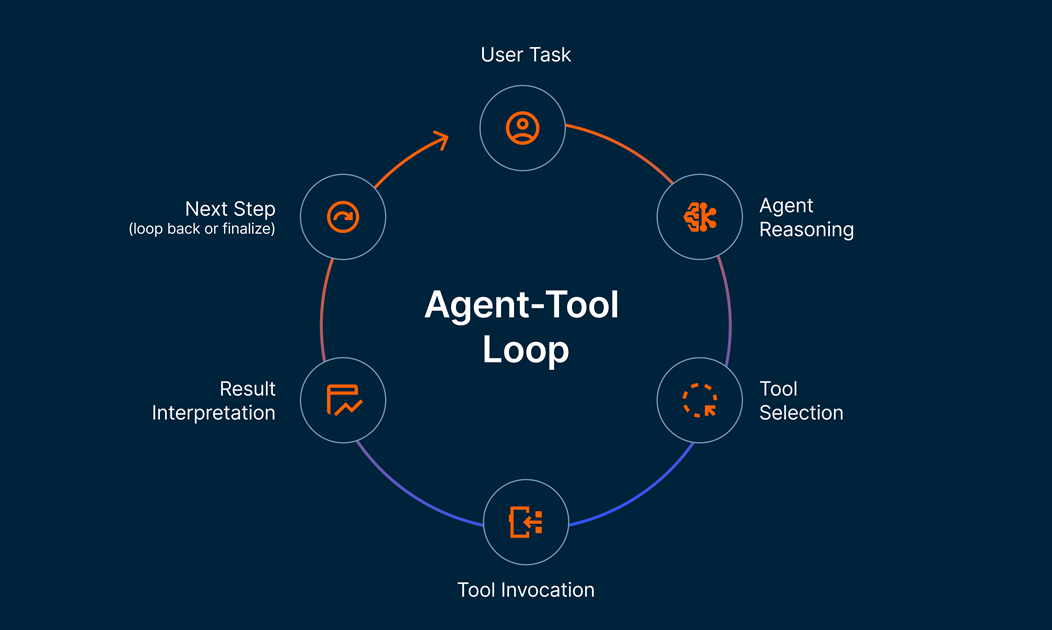
典型的なやり取りはこんな感じです:
- 課題の到来: エージェントは目標を受け取ります—ユーザーリクエスト、トリガーされたイベント、または他のエージェントからのハンドオフ。
- 理由: エージェントのモデルはまず何をすべきかを評価します。利用可能なツールを考慮し、一つを選びます。
- 道具の選択: モデルはツール名とその引数を基に構造化された呼び出しを生成します。
- 道具呼び出し: 選ばれたツールは実行されます:クエリが実行され、APIが返され、コードが実行され、リトリーバーが文書を取得します。
- 結果解釈: エージェントはツールの出力を読み取り、タスクが完了しているかを判断し、最終応答を返すか次のツールを選択します。
- ループ: ステップ2から5までを繰り返し、エージェントが終了と判断するか停止条件に達するまで続けます。
エージェントは、通常JSONスキーマ、OpenAPI仕様、またはMCPツール定義として表現されるツール説明を通じて、利用可能なツールや呼び方を知っています。各説明は、モデルにツールの名前、その機能、必要な入力、そして返されるものを示します。推論モデルは実行時にこれらの記述を用いて、現在のステップに適したツールを選びます。
AIエージェントツール vs. エージェントフレームワーク vs. エージェントプラットフォーム
AIエージェントに関する多くの文章では「ツール」「フレームワーク」「プラットフォーム」を同じ意味で使うため、この話題は初心者には分かりにくいものです。これらは多層的な関係に存在する三つの明確な要素です。
関係は競争的ではなく、入れ子状の関係です。ツールはエージェントが使用するランタイムプリミティブのことです。フレームワークは、開発者がそれらのツールをエージェントに配線するために使うライブラリです。プラットフォームとは、フレームワークやツールが本番環境で動作するマネージド環境のことです。組織はこれら三つを同時に活用でき、ほとんどの組織はそうしています。
AIエージェントツールとモデルコンテキストプロトコル(MCP)
モデルコンテキストプロトコルは、AIエージェントがツールやデータソースに接続する方法に関するオープンスタンダードです。各フレームワークが独自のツール呼び出し形式を発明するのではなく、MCPは一貫した契約を定義します。つまり、サーバーがツールを公開し、エージェントクライアントがそれを発見・呼び出し、両者が同じ言語を話すというものです。
これは三つの実用的な理由で重要です。
- 標準化:MCPを通じて公開されたツールは、統合を書き直すことなく任意のMCP互換エージェントで使用可能です。Teamsはフレームワーク間の重複作業をやめましょう。
- 再利用性:マネージドMCPサーバーは、データベース、ファイルストア、APIなど一般的なシステムをカバーするため、チームはこれらのツールを一から構築する必要はありません。カスタムMCPサーバーは、チームが同じ再利用可能な形状を持つ独自のロジックを公開できるようにします。
- セキュリティの境界線。MCPサーバーはエージェントと基盤システムの間に位置するため、エージェント自体を変更することなくアクセス制御、ログ記録、ポリシーチェックを強制する自然な場所です。
MCPは急速にエンタープライズチームがエージェントにツールを公開するデフォルトの手段となりつつあります。独自の関数呼び出しは依然として存在し機能していますが、今後の方向性は標準化され、再利用可能でポリシー認識のあるツールサーバーへと向かっています。
AIエージェントツールに関する企業向け考慮事項
エージェントツールの信頼性は、触れるデータとそれを取り巻くガバナンス次第です。デモで完璧に動作するツールが、アクセス制御を回避したり、監査ログをスキップしたり、エージェントが気づかない形で静かに失敗すると、本番環境ではリスクとなることがあります。エンタープライズチームは、実際のデータやユーザーの前にエージェントツールを提示する前に、以下の寸法に基づいて評価すべきです。
エンタープライズグレードのAIエージェントツールで注目すべきポイントは以下の通りです:
- 信頼できるデータアクセス: ツールはアドホックコピーではなく、管理された本番品質のデータソースに接続します
- アクセスコントロール: ロールベースの権限や行・列レベルのセキュリティはツールレイヤーで尊重され、回避されることはありません
- 監査可能性: すべてのツール呼び出しには、その入力、出力、そしてそれに至る理由が記録されています
- データ系譜: チームはエージェントが触れたデータ、その出所、使用方法を追跡できます
- 遅延とコストのモニタリング: ツールごとの性能や支出への観測性を、システム全体の集約だけでなく
- ポリシーの執行: エージェントがどのコンテキストで呼び出せるツールを定義するガードレールで、自動的に強制されます
- 優雅な故障処理: ツールは誤りを明確に表し出し、エージェントが成功と解釈する歪んだ結果を返すのではなく
AIエージェントツールの効果を測定する方法
ほとんどのチームはエージェントツールの測定可能な成果を定義していないため、多くのエージェントパイロットが停滞してしまうのです。以下の指標は実用的な出発点です:
- ツールコール成功率: 有効で実用的な結果を返すツール呼び出しのシェア
- 平均ツールレイテンシ: 呼び出しから結果までの時間、各ツールごとに測定
- エージェント1人あたりのコスト: 典型的なワークフローを完成させるための総支出(モデルコールとツールコール合計)は
- 統合の時間です: エージェントのツールキットに新しいツールを追加する速さ
- 保険の補償範囲: ツール呼び出しの共有はガバナンスおよびアクセスの執行の対象となります
- 工具の再利用率: 同じツールが組織内の複数のエージェントにどれだけ頻繁にサービスを提供するか
ユースケースに合ったAIエージェントツールの選択
エージェントに合ったツールを選ぶことは、「最良の」ツールを追いかけるよりも、そのタスクに合った能力をマッチさせることの方が重要です。
実践的な順序:
- まずはタスクから始めましょう: エージェントは実際に何をすべきなのでしょうか?具体的な結果であって、一般的な能力ではありません。
- タスクをツールカテゴリにマッピングする: このタスクに必要な6つのツールタイプのうち、検索、構造化クエリ、API、コード、MCP、カスタムロジック、またはその組み合わせのいずれかですか?
- ツールごとにビルドか購入かを決める: 必要なツールごとに、マネージドMCPサーバー、フレームワークネイティブツール、カスタムビルドのいずれかが適切かを評価してください。コスト、維持管理負担、ガバナンスはすべてに当てはまります。
- 本番環境の前にガバナンスと可観測性を検証する: 各ツールがアクセス制御を尊重し、監査ログを作成し、故障を診断するのに十分なテレメトリを公開しているかを確認しましょう。
これら4つのステップを踏むチームは、本番環境に到達するエージェントを明確に出荷します。タスクをマッピングせずに工具選択に進むチームは、脆弱なプロトタイプになってしまう。
よくある質問
まだAIエージェントツールについて質問がありますか?ここでは、よくある質問への回答をいくつかご紹介します。
AIエージェントのためのツールとは何ですか?
AIエージェントのためのツールとは何ですか?
AIエージェント向けのツールとは、タスク中にエージェントが呼び出せる実行可能な機能のことです。関数、API、データベースクエリ、リトリバー、コードインタプリタ、カスタムビジネスロジックなどです。エージェントをテキスト生成を超えて拡張し、実際の行動を取らせます。情報の検索、データのクエリ、サービスの呼び出し、コードの実行などです。
AIエージェントツールの主な種類は何ですか?
AIエージェントツールの主な種類は何ですか?
AIエージェントツールの主な種類は、データ検索ツール(非構造化コンテンツ用)、構造化データおよびクエリツール(ガバナンスされたエンタープライズデータ用)、APIおよびコネクタツール(外部サービス用)、コード実行ツール(計算および変換用)、MCPサーバーツール(モデルコンテキストプロトコルによる標準化されたツールインターフェース)、およびカスタムビジネスロジックツール(独自ルールやワークフロー用)です。
AIエージェントツールとAIエージェントフレームワークの違いは何ですか?
AIエージェントツールとAIエージェントフレームワークの違いは何ですか?
AIエージェントツールとは、エージェントが作業を遂行するために実行時に呼び出す能力のことです。AIエージェントフレームワークとは、LangChain、LlamaIndex、CrewAI、AutoGenのような開発者向けライブラリで、そもそもエージェントを組み立てるためのものを指します。ツールとはエージェントが使うものです。フレームワークは開発者がエージェントを構築する際に使うものです。
オープンソースのAIエージェントツールはありますか?
オープンソースのAIエージェントツールはありますか?
はい。オープンソースの選択肢としては、共通システム向けのコミュニティMCPサーバー、LangChainやLlamaIndexのようなフレームワーク内の組み込みツールライブラリ、再利用可能なツールの公開カタログなどがあります。ほとんどの本番環境での展開は、標準機能のためのオープンソースツールと、独自のロジック用カスタムツールを組み合わせています。
AIエージェントはどのようにしてどのツールを使うべきかを知るのでしょうか?
AIエージェントはどのようにしてどのツールを使うべきかを知るのでしょうか?
各ツールには説明文が付いており、通常はJSONスキーマ、OpenAPI仕様、またはMCPツール定義などで、ツールが何をするのか、どんな入力が必要か、何を返すのかをエージェントに伝えます。エージェントの推論モデルは実行時にこれらの記述を読み取り、タスクと利用可能な選択肢に基づいて現在のステップに適したツールを選択します。